HR for growing teams, without the spreadsheets.
Peopl brings hiring, onboarding, attendance, leave and payroll into one workspace, so month-end stops being a scramble.
RRequest a pilot DTry demo MModules ?All shortcuts
- Modules
- 17, one login
- Payroll
- PF, ESIC, TDS, professional tax
- Pilot
- Free for 30 days
- Setup
- Guided, with our help
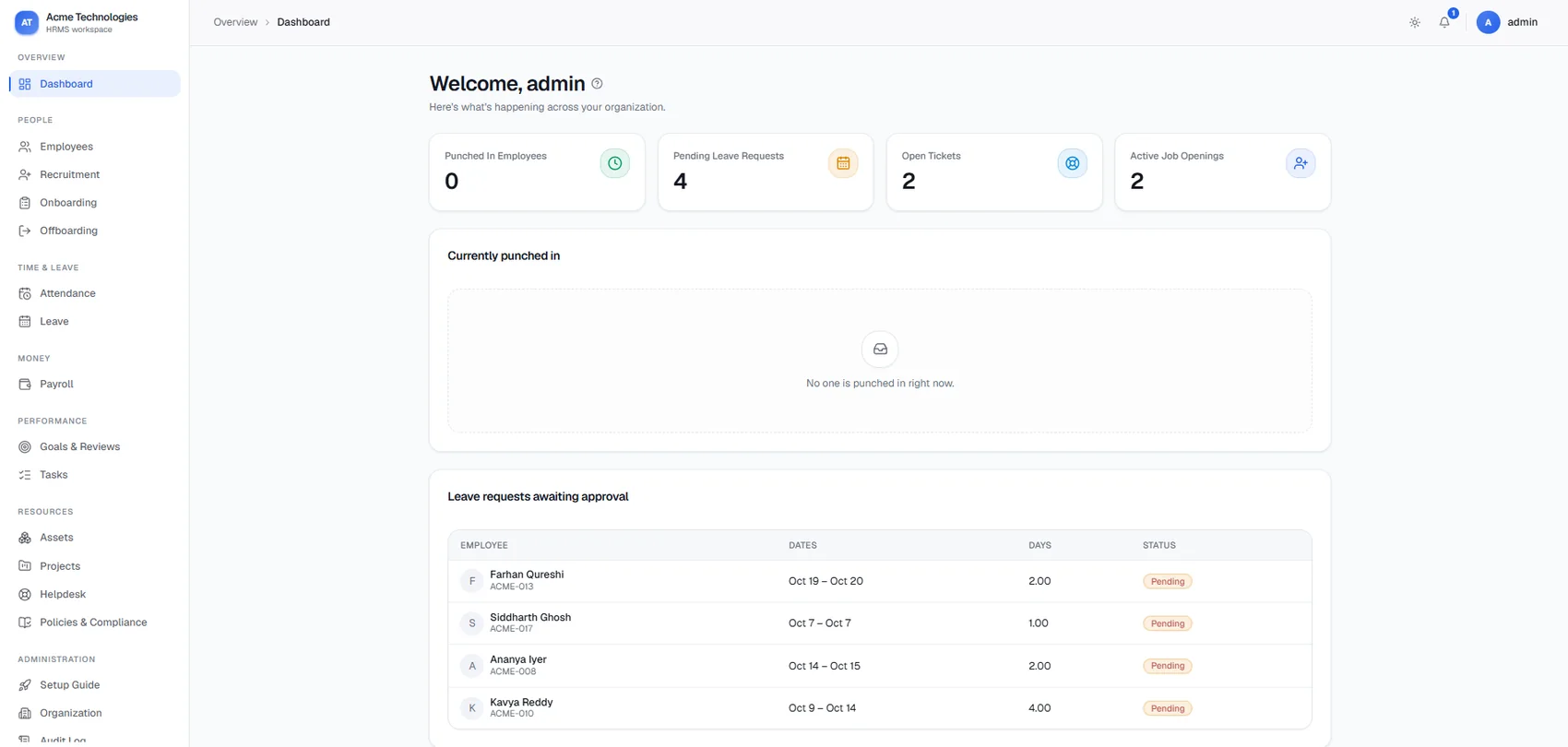
Dashboard: who has punched in, leave waiting for approval, open helpdesk tickets and active job openings.
The jobs most small teams still do by hand.
Fewer tools. One record.
| Job | Usually handled in | In Peopl |
|---|---|---|
| Attendance and leave | Excel sheets, WhatsApp messages | Attendance, Leave |
| Payroll and payslips | Spreadsheet formulas | Payroll |
| Joiners and leavers | Email threads, paper checklists | Onboarding, Offboarding, Assets |
| Hiring | Inbox and shared folders | Recruitment |
| Employee requests | Calls and chat messages | Helpdesk |
| Policies | PDFs on a shared drive | Policies & Compliance |
Start with attendance and payroll. Switch on the rest as you grow.
Seventeen modules, one login.
People
- Employees
- Recruitment
- Onboarding
- Offboarding
Time & leave
- Attendance
- Leave
Money
- Payroll
Performance
- Goals & Reviews
- Tasks
Resources
- Assets
- Projects
- Helpdesk
- Policies & Compliance
Administration
- Setup Guide
- Organization
- Audit Log
- Permissions & Access
Secure by default.
Control who sees what. See what changed.
Salary and personal data should only reach the people who need it. Peopl ships with role-based access and a full audit trail for every change.
- Permissions & Access
- Each person sees what their role allows, nothing more.
- Audit Log
- Every change is recorded, so "who edited this?" has an answer.
- Separate workspaces
- Each company's data lives in its own workspace, isolated from every other customer.
- Organization
- Departments and positions that mirror how your company is built.
Questions we hear first.
Straight answers.
The product
What is Peopl?
Peopl is HR software for growing teams. It keeps your employee records, attendance, leave, payroll, hiring, onboarding and exits in one place, so you stop stitching together spreadsheets, chats and email threads.
Do I have to use every module?
No. Most teams start with Employees, Attendance, Leave and Payroll, then switch on Recruitment, Helpdesk, Assets or Goals & Reviews when they need them. See the full module list.
Can employees log in themselves?
Yes. Each employee gets their own login with a restricted view: they see their own profile, apply for leave and raise helpdesk tickets. Managers and HR see more, depending on the role you give them.
Do I need to install anything?
No. Peopl runs in the browser, so there is nothing to install for your HR team or your employees.
How is attendance captured?
Attendance comes from punches, with Regularizations for missed or wrong punches. You can register Biometric Devices and set Geofence Zones for location-based punching. Tell us which devices you use and we will check them during the pilot.
Can we set our own leave types and holidays?
Yes. You define leave types, the holiday calendar and leave balances for your company. Leave requests then go through approval and show up in the attendance cycle.
Does payroll follow Indian rules?
Payslips are in rupees and include PF and ESIC, income tax (TDS) and professional tax. During the pilot we check your salary structure and deductions against how you run payroll today.
Data & security
Who can see salary and personal data?
Access is role-based, so people see only what their role allows, and the audit log records every change. Read the Data Security Policy for the details.
Is our data kept apart from other companies?
Yes. Every company gets its own workspace, and data in one workspace is not visible to any other customer.
Can we take our data out?
Yes. The employee directory has an export, and payslips can be exported individually. If you leave, we help you export everything first.
Pilot & pricing
Can I see it before committing to anything?
Yes. Ask for a walkthrough and we will show you the modules you care about with sample data, then set up a pilot with your own.
How long does setup take?
The built-in Setup Guide takes you through organization, employees and rules in order, and we sit with you for the first pass. We aim to get your first payroll run done inside the first week of your pilot.
Can you load our existing employee data?
Yes. Send us what you track today and we help load your first batch of employees during the pilot.
What does it cost after the pilot?
Founding customers get pricing that stays with them. Tell us your team size in the form and we will send a clear quote before the pilot ends. See the Payment Policy for how billing works.
Retire the spreadsheets this month.
Peopl is live, and we are working closely with a small group of founding teams. You get the builder's full attention.
- Free 30-day pilot with your real employee data
- Hands-on setup by the person who built Peopl
- Founding-customer pricing that stays with you
- A direct line for questions and feature requests